From Brief to Brand

Everyone builds a complete brand from scratch using AI. Strategy, naming, visual identity, campaign, brand film, and a live website.

1
Getting better results from AI
Thursday 5 March

What you leave with tonight

Personal Brief

A document about who you are and how you work — loaded into H+Co ChatGPT so every AI conversation is calibrated to you.

Deep Research output

A comprehensive research document covering the competitive landscape, cultural moment, and category conventions.

Research extraction

Structured strategic insights — audience options, brand enemies, whitespace, and one cultural tension.

Brand Strategy document

Your four human decisions — audience, enemy, tone, one word — compiled on a single page. The foundation for everything.

Brand project folder

A dedicated folder in H+Co ChatGPT where your brand conversations live — ready for Session 2.

Step 01

Choose your category

Pick one of four product categories: Functional Drink, Dog Food, Sunscreen, or Trail Shoe.

Your brief

A lightly sparkling, adaptogen-based functional drink. Australian-made. 330ml cans. Three flavours at launch.

Category: Functional beverages — the fastest-growing segment in Australian non-alcoholic drinks. Currently dominated by two extremes: clinical wellness brands that lecture you about ingredients, and energy drinks that treat your body like a machine.

Competition: Remedy (gut health, friendly, approachable), Nexba (sugar-free, clean, functional), Liquid Death (attitude-first, punk water), Red Bull (performance, extreme, unapologetic). None of them talk to the person who's outgrown energy drinks but hasn't bought into the wellness aesthetic.

The person: Works hard, thinks carefully about what they consume, but doesn't make a performance of it. Not a wellness warrior. Not a gym bro. Someone who wants to feel sharp without feeling like they've joined a movement.

The occasion: 2pm on a Tuesday. The meeting that won't end. The afternoon where coffee feels like too much and water feels like not enough. Or: the Saturday morning replacement for the hangover coffee.

The tension: Every functional drink either talks to you like you're sick (wellness) or like you're a machine (energy). Nobody talks to you like you're a person who wants to feel good and get on with their day.

The brief gives you the tension — your job is to resolve it.

Technique What it does
Prompt chaining One tool's output becomes the next tool's input — each step builds on the last
Role prompting Assigning Claude a specific perspective or expertise before you ask your question
Step 02

Write your Personal Brief

Open Claude in H+Co ChatGPT. Claude will interview you — one question at a time — about your role, what you're working on, how you like to communicate, and what you want AI to help you with. When it has enough, ask it to compile everything into a Personal Brief.

Save it in your H+Co ChatGPT system settings. Paste a copy into your Google Doc.

H+Co ChatGPT
Step 03

Launch your research

Open Gemini Deep Research and brief it to investigate your category — competitive landscape, white space, audience mindsets, cultural tensions, and what existing brands are getting wrong.
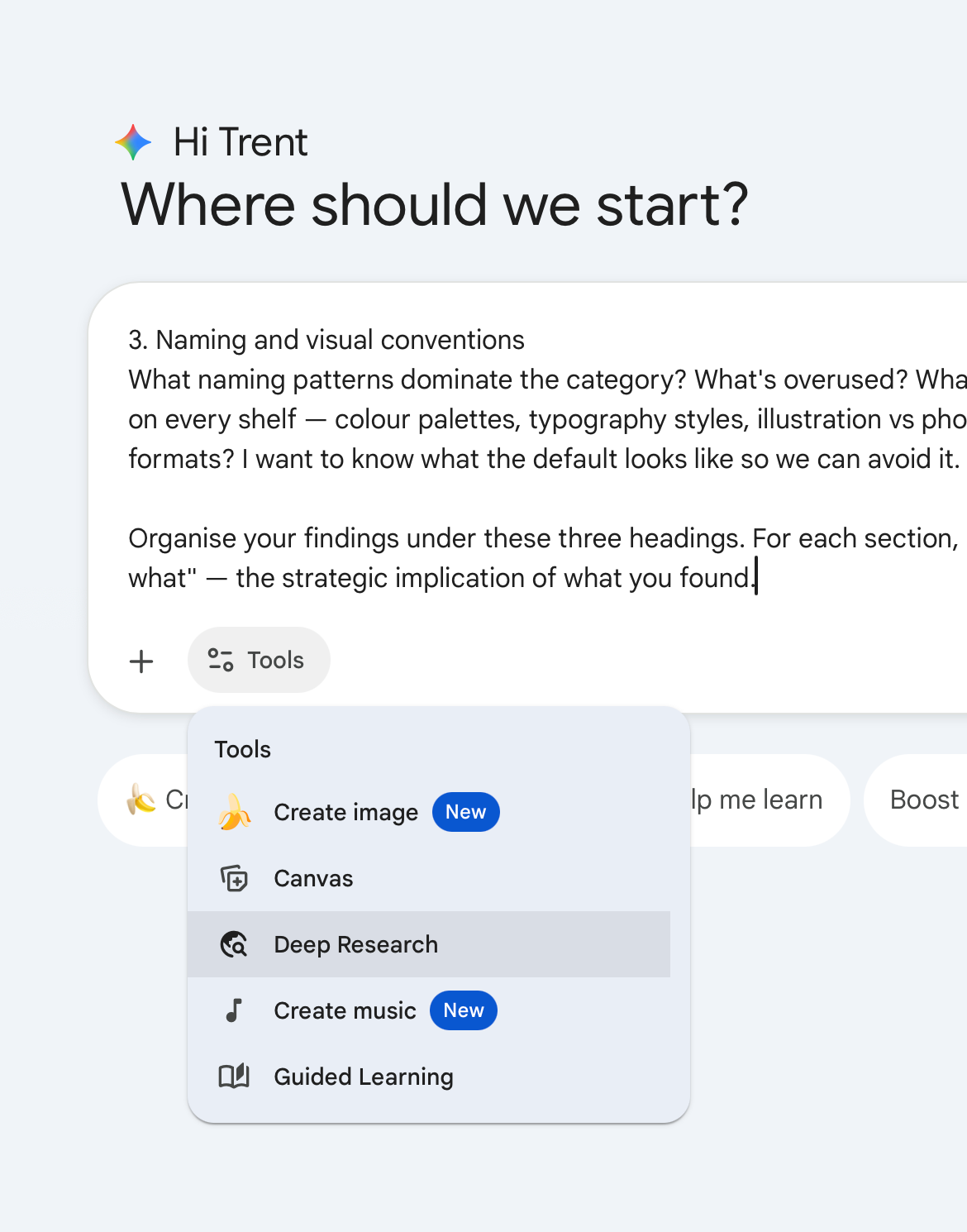
Select Deep Research from the Tools menu

Hit go.

This is prompt chaining — using the output of one tool as the input for the next. What Gemini finds becomes the raw material Claude works with in the next step.
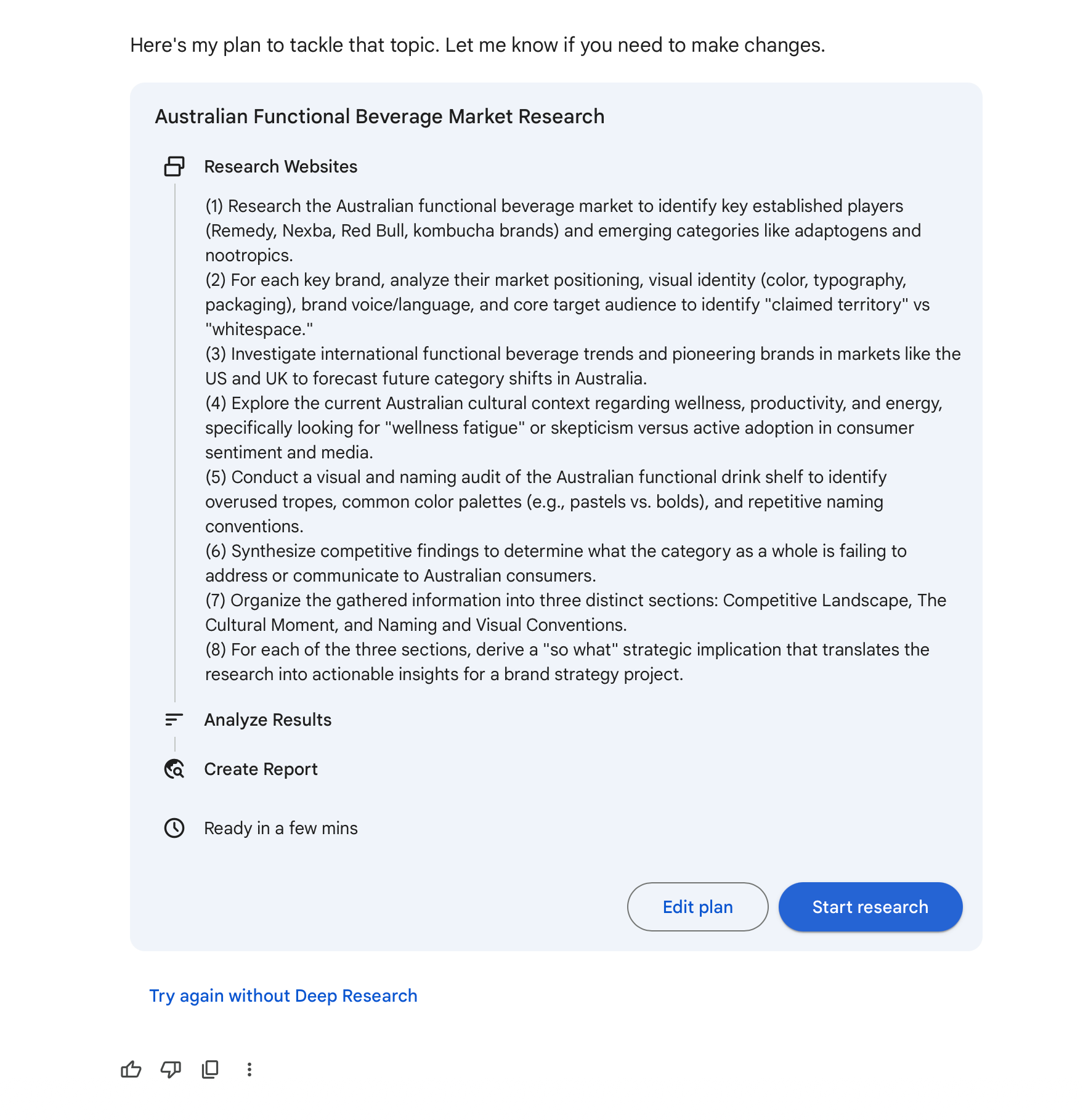
Google Workspace

Gemini generates a research plan and starts working

Step 04

Extract what mattersPrompt chaining

Your research is back. Paste the full output into your Google Doc, then into Claude and ask it to extract the most interesting audience mindsets, the strongest brand enemies, the cultural tension in the category, and any white space that feels unclaimed.

Ask for options, not conclusions. You're not asking Claude to make your strategy — you're asking it to surface possibilities. The decisions are yours.

Paste Claude's extraction into your Google Doc.

H+Co ChatGPTPrompt chaining
Step 05

Make four decisionsRole prompting

Work through these in order. For each one, assign Claude a role before you ask — this is role prompting. Same question, different expertise, different answer.

1 Pick your audience

Ask a cultural strategist for three distinct audience options. Review them, pick one. Claude will push back and ask you to justify it. Sit with it before you confirm.

H+Co ChatGPTRole prompting

2 Pick your enemy

Ask a brand strategist for three things this brand could position itself against. Not a competitor — an attitude, a behaviour, or a category cliche. Pick one.

H+Co ChatGPTRole prompting

3 Pick your tone

Three options only: irreverent, understated, or earnest. Ask Claude to make the case for each given your audience and enemy. Pick one.

Irreverent

Confident, slightly cheeky, willing to poke fun at the category. Doesn't take itself too seriously.

"Your kombucha is trying too hard. We're just a drink."

Understated

Quiet confidence. Says less, means more. Premium without performing it.

"Feel good. Get on with your day."

Earnest

Genuine, warm, direct. Believes in what it's doing without being preachy about it.

"We made this because we wanted something better. We think you will too."

4 Pick your word

If this brand could own one word in the mind of the consumer, what would it be? Ask for three options with the logic behind each. Pick one.

These four decisions are where sixty people in the room become sixty different brands. Same brief, same tools — the decisions compound.

H+Co ChatGPT
Step 06

Build your Brand Strategy document

Ask Claude to compile everything into a one-page Brand Strategy document — your audience, enemy, tone, one word, and the cultural tension the brand lives inside.

Paste it into your Google Doc.

H+Co ChatGPT

Before next Thursday

  • Your Google Doc is your record — make sure everything is in there
  • Set up your brand project folder in H+Co ChatGPT
  • Full documentation is on its way — if you didn't finish something tonight, complete it before Session 2

Next week: naming, visual identity, and building an AI assistant that knows your brand inside out.

Techniques you used tonight

Technique What it is
Prompt chaining Using the output of one tool as the input for the next
Role prompting Assigning Claude a role before asking — changes the angle of the answer
Next week
Session 2: Naming, Brand Strategy One Pager, and Brand Assistant
You'll explore naming with three different prompting techniques, land on a name, distil everything into a Brand Strategy One Pager, and build a working AI assistant that knows your brand inside out.

Didn't finish everything? No worries. Full documentation is provided so you can complete anything before next Thursday. The next session doesn't require tonight to be 100% complete — but your deliverables will make it much smoother. Need to catch up on both sessions? Try the Speedrun.

2
Naming & Identity
Thursday 12 March

What you leave with tonight

Brand Strategy One Pager

A one-page strategy document and a system prompt that makes AI speak in the brand's voice. The reference and the behaviour layer for everything you build from here.

Brand name

Stress-tested across three models, checked for domain and trademark viability.

Visual identity brief

Colour palette (hex codes), type direction, and visual feeling. A brief an image generation tool can act on directly.

Logo mark

A starting-point logo generated through prompt iteration in Nano Banana Pro.

Before you start

Every prompt tonight adds three things that last week's didn't:

  1. A format constraint (table, list, specific sections)
  2. A tone instruction (plain language, no editorialising)
  3. A hard length cap (specific word counts, not "keep it concise")
Technique What it does
Multi-model comparison Same prompt sent to multiple models at once. The variable is the model, not the technique
Few-shot prompting Providing examples of quality and format before asking. Output matches a standard
Meta-prompting Using AI to write the prompt that then briefs AI. Each layer of translation is meta-prompting
Step 01

Build your Brand Strategy One Pager

Optional. If your Session 1 Brand Strategy is clean and usable, skip to Step 2. If it drifted into essay territory, this gets you to a tight starting point.

Open a new conversation in H+Co ChatGPT. Paste your product category brief (Session 1 Step 1) and your research extraction (Session 1 Step 4). Do not paste the Brand Strategy. We're synthesising fresh from the source material.

One prompt in, one Brand Strategy One Pager out. Review after and edit anything that doesn't match the decisions you made last week.

H+Co ChatGPT
Step 02

Name your brand

Naming has two parts. First, compare three prompting techniques. Then compare three models.

Three techniques, one model

Start a new chat for each technique so outputs aren't influenced by previous attempts.

H+Co ChatGPTZero-shot prompting
H+Co ChatGPTFew-shot prompting
H+Co ChatGPTChain-of-thought prompting

Compare the three lists. Which technique gave you the most usable names? Keep that in mind.

Three models, one prompt

Take whichever naming prompt produced the best results and run it across all three models in H+Co ChatGPT:

  • Gemini Pro 3.1 Thinking
  • ChatGPT 5.2
  • Claude Sonnet Thinking

Pick your top 3 from across everything, then stress-test them.

H+Co ChatGPT

Paste the multi-model comparison and stress test into your Google Doc.

Step 03

Update your Brand Strategy One Pager

Add your chosen name and a one-line brand descriptor (what the brand is in plain language, 10 words max) to the Brand Strategy One Pager.

Update the knowledge document in your brand project folder with the completed Brand Strategy One Pager.

Step 04

Build your Brand AssistantMeta-prompting

Open a new conversation inside your brand project folder. The Brand Strategy One Pager is already loaded as folder knowledge, so no pasting needed.

Check it's working by asking: "What brand are you working on?" — if the model can't answer, go to folder settings and re-attach the document.

Send the prompt below. Read the output, adjust anything that doesn't match your brand, then set it as the folder's system prompt.

H+Co ChatGPT — inside brand folderMeta-prompting
Step 05

Write your visual identity briefMeta-prompting

Stay inside your brand folder. Three stages: explore visual directions, compile the brief, generate a mood board.

Stage 1: Explore visual directions

H+Co ChatGPT — inside brand folderMeta-prompting

Review the options and tell the model what works. You can mix and match across categories.

Stage 2: Compile the brief

Once you've landed on your directions, ask the model to compile everything into a single brief.

H+Co ChatGPT — inside brand folderMeta-prompting

Paste the visual identity brief into your Google Doc.

Stage 3: Generate a visual identity mood board

Open a new chat in Nano Banana Pro. Paste your visual identity brief, then send this prompt:

Nano Banana ProAI-to-image prompting

Save the mood board to your Google Doc.

Step 06

Generate your logo

Two stages: brainstorm in your brand folder, then generate in Nano Banana Pro.

Stage 1: Brainstorm with your Brand Assistant

Stay in your brand folder. This is a creative conversation — talk through concepts, shapes, and visual references with the model.

When you've landed on a direction, ask the model to write a structured image generation prompt for Nano Banana Pro.

H+Co ChatGPT — inside brand folder

Stage 2: Generate in Nano Banana Pro

Search for "NanoBanana Pro prompting tips" in ChatGPT (web search ticked) for the latest advice. Open a new chat, select Nano Banana Pro, attach the "Nano Banana Pro Prompting" note, and paste your image generation prompt from Stage 1.

Iterate with specific feedback. Refer to the iteration guidance in the Nano Banana Pro Prompting note.

Save your best logo to your Google Doc.

Nano Banana Pro

Before next Thursday

  • Your Google Doc should contain: Brand Strategy One Pager, naming comparison, stress test, visual identity brief, and logo
  • Your brand folder in H+Co ChatGPT should have: the Brand Strategy One Pager as folder knowledge, the Brand Assistant as folder system prompt
  • If you didn't finish something tonight, the documentation above has everything you need to complete it before Session 3

Next week: campaign production. You'll create a product or packaging mockup and an OOH execution, with the Brand Assistant governing every brief.

Techniques you used tonight

Technique What it is
Persistent context Using project folders with knowledge documents and system prompts to give AI consistent brand context across every conversation
Zero-shot prompting Asking with no examples and no extra context. The baseline for what the model produces on its own
Few-shot prompting Providing reference examples to set a quality standard and naming approach before asking
Chain-of-thought prompting Asking the model to reason through the problem step by step before generating output
Multi-model comparison Same prompt sent to multiple models simultaneously. Compare outputs to find the strongest result
Meta-prompting Using AI to write the brief that then briefs AI. Brand Strategy One Pager becomes system prompt becomes visual brief
AI-to-image prompting Using a text model to brainstorm and write structured prompts that brief an image generation tool
Next week
Session 3: Campaign Production
You'll produce two finished campaign assets, a product or packaging mockup and an OOH execution, through an AI-to-image workflow governed by your Brand Assistant.

Didn't finish everything? No worries. Full documentation is provided so you can complete anything before next Thursday. The next session doesn't require tonight to be 100% complete — but your deliverables will make it much smoother. Need to catch up on both sessions? Try the Speedrun.

3
Campaign Production
Thursday 20 March

What you leave with tonight

Product mockup

A photorealistic product shot generated through a brief written by your Brand Assistant and rendered in Nano Banana Pro.

OOH execution

A billboard ad — concept, headline, and visual — mocked up in a real-world setting.

Step 01

Refine your brand

Everything your Brand Assistant produces is shaped by the documents in your folder. If something feels off, this is where you fix it.

If you're unhappy with anything from last week — your logo, your tone of voice, your colour palette, your overall strategy — this is where you fix it.

Start by extracting what you have. Open a conversation in your brand folder and send:

H+Co ChatGPT — inside brand folder

Copy the output into a new chat outside your brand folder — no system prompt. This gives you a clean workspace to iterate without the assistant defending its own instructions. Paste the document and give specific, line-by-line feedback. For example:

  • "The colour palette looks like every other wellness drink — I want something that doesn't scream 'natural'"
  • "The photography direction is too clean and aspirational — make it more real and less lifestyle"
  • "The tone section says 'authentic' but that's meaningless — make it specific to how actual people talk about what they drink"
  • If your logo or visual identity needs work, iterate in your brand folder until you're happy

Go back and forth for 2–3 rounds until the document feels right.

Step 02

Test your Brand Assistant

Open a new conversation inside your brand folder. Send these three test prompts to check your Brand Assistant is working.

H+Co ChatGPT — inside brand folder
Step 03

Create your product mockup

Five stages: define your product, generate a product image, brainstorm shot concepts, write the brief, generate the hero shot.

Define your product

Your Brand Assistant doesn't know your product's physical form yet. Define it before brainstorming shots.

Stay in your brand folder. Send this prompt and have a conversation until you've landed on a clear product description.

H+Co ChatGPT — inside brand folder

Generate your product image

Now that you've defined your product, generate a clean product shot on a plain background. This becomes your reference asset for the rest of the session.

Open a new chat in Nano Banana Pro. Upload your brand logo and send:

Nano Banana ProAttach: Brand Logo

Brainstorm shot concepts

Stay in the same conversation. Now that you've defined your product, brainstorm how to photograph it.

In the same chat

Write the shot brief

Stay in the same conversation. Pick a concept you like and ask the Brand Assistant to write a structured shot brief.

In the same chat

Generate the hero shot

Open a new chat in Nano Banana Pro. Upload the product image you generated earlier as a visual reference and send:

Nano Banana ProAttach: Product Image

If you don't like your image, go back to your chat in H+Co ChatGPT and iterate on the brief with your Brand Assistant, then paste the updated brief into Nano Banana Pro.

Step 04

Critique your mockup with AI

Get your Brand Assistant to write a critique prompt, then use it with a model that can see the image.

Write the critique prompt

Stay in your brand folder. Ask the Brand Assistant to write a critique prompt based on everything it knows about your brand.

H+Co ChatGPT — inside brand folder

Run the critique

Open a new chat in Gemini Pro 3.1. Upload your product mockup — the image attached is the product shot being critiqued. Paste the critique prompt.

You won't agree with everything — take what's useful, ignore what isn't. If something's worth fixing, go back to your brand folder and iterate on the brief.

Step 05

Brainstorm your campaign

Before you make the billboard, figure out what the campaign is actually saying.

H+Co ChatGPT — inside brand folder

Pick a concept and headline to execute in the next step. You can combine elements from different concepts if something interesting emerges.

Step 06

Create your billboard ad

You've got a concept and a headline from Step 5. Now execute it — write the shot brief, generate the image, mock it up.

Write the shot brief

In the same chat

Generate the billboard

Open a new chat in Nano Banana Pro. Upload your brand logo and send:

Nano Banana ProAttach: Brand Logo

If you don't like your image, go back to your chat in H+Co ChatGPT and iterate on the brief with your Brand Assistant, then paste the updated brief into Nano Banana Pro.

Mock it up

Save your best billboard image from the step above. Upload it to the same chat and send:

Nano Banana ProAttach: OOH Execution
Step 07

Keep going

Pick one and keep working:

  • Second billboard — different concept or a different format (bus shelter, phone kiosk)
  • Product range shot — multiple flavours or variants in one frame
  • Refine existing assets — iterate further on your mockup or billboard
  • Update your brand documents — if the campaign work revealed something new about your brand's visual direction or strategy, update the relevant document in folder knowledge and your system prompt

No new prompts needed — reuse the workflows from Steps 3 and 6.

Before next Thursday

Your Google Doc should contain:

  • Refined brand documents or system prompt changes (Step 1)
  • Brand Assistant test results (Step 2)
  • Product description (Step 3)
  • Product mockup image (Step 3)
  • Campaign concept and headline (Step 5)
  • OOH billboard mockup (Step 6)

Your brand folder should have: updated folder knowledge and system prompt reflecting any changes from tonight.

If you didn't finish something tonight, the documentation above has everything you need to complete it before Session 4.

Next week: brand film and live website. You'll create a short brand film using a prompt-to-video workflow, then build and publish a real website using AI.

Techniques you used tonight

Technique What it is
Persistent context Your Brand Assistant governs every brief — strategy, tone, and visual constraints are always present without re-pasting
Specific feedback Line-by-line, section-by-section feedback that tells the model exactly what's wrong and what you want instead. "Make it better" fails — "this looks like every kombucha brand, make it darker" works
AI-to-image prompting Text model writes the shot brief, image tool generates. Thinking and making stay separate
Iterative prompting Specific feedback on each generation — never regenerate from scratch, build on what works
Prompt writing Getting AI to write prompts for you. Describe the task, say what you're evaluating, and ask for a structured prompt you can paste elsewhere
Visual reasoning Using Gemini Pro 3.1 to analyse images — it can see composition, colour, brand fit, and give feedback a text-only model can't
Reference image prompting Uploading existing assets (logo, previous outputs) as visual references for consistency
Next week
Session 4: Brand Film & Live Website
You'll create a short brand film using a prompt-to-video workflow, then build and publish a real website using AI. Everyone finishes with a live URL.

Didn't finish everything? No worries. Full documentation is provided so you can complete anything before next Thursday. The next session doesn't require tonight to be 100% complete — but your deliverables will make it much smoother. Need to catch up on both sessions? Try the Speedrun.

4
Brand film and live website
Thursday 26 March

What you leave with tonight

Brand film

A short video generated through a text-to-image-to-video workflow, briefed by your Brand Assistant and produced in After Dark Video.

Live product website

A published website with your brand name, hero image, product description, and a call to action — built entirely through natural language in Google AI Studio.

Step 01

Brainstorm your film concept

Your brand film is a 10-second video — a single moment, not a story. Before you write the brief, you need to decide what that moment is.

Open a conversation inside your brand folder and send:

H+Co ChatGPT — inside brand folder

Read through the options and pick one — or combine two. If nothing grabs you, tell the assistant what's missing and ask for five more.

Step 02

Write your video brief

You've picked the moment — now turn it into a brief that tells the video tool exactly what to make.

In the same conversation, upload your brand logo and send:

Same chatAttach: Brand Logo

Iterate until the scene feels right. The more specific the brief, the better the video.

Step 03

Generate your start frame

Generate a still image of your film's opening shot. This is what the video tool will animate from.

In the same conversation, ask your Brand Assistant to write an image generation prompt for the opening frame:

Same chat

Copy the output. Open a new chat in Nano Banana Pro, upload your brand logo and product image from Session 3, and paste the prompt:

Nano Banana ProAttach: Brand Logo, Product Image

If your film ends on a different scene from where it starts — for example, it opens on the environment and ends on a product close-up — generate an end frame too. Go back to your Brand Assistant conversation and send:

Same chat

Copy the output and paste it into Nano Banana Pro with your logo and product image attached:

Nano Banana ProAttach: Brand Logo, Product Image
Step 04

Generate your brand film

Open After Dark Video Studio and select Image → Video. Upload your start frame. If you generated an end frame, upload that too.

Paste your Video Prompt from Step 2 into the Prompt field — this is the short version optimised for the video tool, not the full brief.

Set the duration to 10 seconds and hit Generate. If the first result isn't right, adjust your prompt and try again.

Step 05

Write your website brief

Your Brand Assistant knows your strategy, visual identity, tone, and product. Use it to write a complete website brief — one prompt in, one brief out.

Open a conversation inside your brand folder. Upload your brand logo and send:

H+Co ChatGPT — inside brand folderAttach: Brand Logo

Read the brief. If anything doesn't sound like your brand, tell the assistant what's wrong and ask it to rewrite that section.

Step 06

Build your website

Open Google AI Studio and start a new project in Build mode. Paste your website brief and send it. AI Studio will generate a working website with a live preview.

From here, it's a conversation. Describe what to change:

  • "Make the hero section full-bleed"
  • "The CTA button should be [HEX CODE]"
  • "The about section copy is too long — cut it to two sentences"
  • "Add a fade-in animation as I scroll down"

You can also click on any part of the preview and describe the change you want.

When you're happy with the site, click Deploy App in the top right. AI Studio will publish it and give you a live URL anyone can visit.

You're done

Four sessions. One brand. Built from nothing.

Your Google Doc should contain:

  • Brand strategy and visual identity (Session 1)
  • Tone of voice and Brand Assistant (Session 2)
  • Product mockup and OOH billboard (Session 3)
  • Brand film and live website URL (Session 4)

Deadline: Tuesday, 1 April — submit your Google Doc with all outputs, brand images, OOH execution, brand film, and live website URL.

Showcase: Thursday, 3 April — best brands presented at the monthly memo.

Techniques you used tonight

Technique What it is
Persistent context Your Brand Assistant governed every brief tonight — four weeks of accumulated context in every output
Prompt-to-video Text model writes the brief, image tool renders the frame, video tool adds motion. Three tools, each doing what it's best at
Vibe coding Building a website through conversation. You described what to make, AI built it, you iterated until it was right

Didn't finish everything? No worries. Full documentation is provided so you can complete anything before next Thursday. The next session doesn't require tonight to be 100% complete — but your deliverables will make it much smoother. Need to catch up on both sessions? Try the Speedrun.

Speedrun: Zero to Session 4
~120 min

What you leave with

Brand Strategy One Pager

Complete strategy document with name, audience, enemy, tone, and word.

Brand Assistant

A system prompt that makes AI speak in your brand's voice.

Visual Identity Brief

Colour palette, typography, visual feeling, and photography direction.

Logo

Starting-point logo generated through AI-to-image prompting.

Product Mockup

A photorealistic product shot generated through a brief written by your Brand Assistant.

OOH Execution

A billboard ad — concept, headline, and visual — mocked up in a real-world setting.

Week One
Fast track

Too busy for the full speedrun? Download these two files, set up a brand project folder in H+Co ChatGPT, and jump to Step 7.

Skip to Step 7 →
Step 01

Choose your product

Your brief

A lightly sparkling, adaptogen-based functional drink. Australian-made. 330ml cans. Three flavours at launch.

Category: Functional beverages — the fastest-growing segment in Australian non-alcoholic drinks. Currently dominated by two extremes: clinical wellness brands that lecture you about ingredients, and energy drinks that treat your body like a machine.

Competition: Remedy (gut health, friendly, approachable), Nexba (sugar-free, clean, functional), Liquid Death (attitude-first, punk water), Red Bull (performance, extreme, unapologetic). None of them talk to the person who's outgrown energy drinks but hasn't bought into the wellness aesthetic.

The person: Works hard, thinks carefully about what they consume, but doesn't make a performance of it. Not a wellness warrior. Not a gym bro. Someone who wants to feel sharp without feeling like they've joined a movement.

The occasion: 2pm on a Tuesday. The meeting that won't end. The afternoon where coffee feels like too much and water feels like not enough. Or: the Saturday morning replacement for the hangover coffee.

The tension: Every functional drink either talks to you like you're sick (wellness) or like you're a machine (energy). Nobody talks to you like you're a person who wants to feel good and get on with their day.

Copy the brief above — you'll paste it into prompts in the next steps.

Step 02

Research your category

Open Gemini Deep Research and paste this prompt. It takes 3-5 minutes to run — use the time to set up your Google Doc.

Gemini Deep ResearchPrompt chaining

Paste the full research output into your Google Doc when it's done.

Step 03

Extract what mattersPrompt chaining

Paste your Gemini research into H+Co ChatGPT with this prompt.

H+Co ChatGPTPrompt chaining
Step 04

Build your Brand Strategy One Pager

Open a new conversation in H+Co ChatGPT. Paste your product brief (from Step 1) and your research extraction (from Step 3). Review and edit — this document drives everything from here.

H+Co ChatGPT
Week Two
Step 05

Name your brandFew-shot prompting

Open a new conversation in H+Co ChatGPT.

H+Co ChatGPTFew-shot prompting

Pick your top 3. Stress-test them:

H+Co ChatGPT

Pick your name. Add it and a one-line brand descriptor (10 words max) to the Brand Strategy One Pager. Update the knowledge document in your brand folder.

Step 06

Build your Brand AssistantMeta-prompting

Open a new conversation inside your brand project folder.

H+Co ChatGPT — inside brand folderMeta-prompting
Step 07

Visual identity and logo

Stay inside your brand folder. Two parts: build the visual brief and mood board, then brainstorm and generate the logo.

Visual identity brief

Ask the Brand Assistant to write a compiled visual identity brief directly — colour palette, type direction, visual feeling, photography direction, and what the brand never looks like.

H+Co ChatGPT — inside brand folderMeta-prompting

Paste the visual identity brief into your Google Doc.

Mood board

Open a new chat. Select Nano Banana Pro as the model. Paste your visual identity brief, then this prompt:

Nano Banana ProAI-to-image prompting

Logo

Go back to your brand folder. Brainstorm logo directions with the Brand Assistant, then generate in Nano Banana Pro.

H+Co ChatGPT — inside brand folder

Take the image generation prompt into Nano Banana Pro and generate. Iterate with specific feedback:

Nano Banana Pro

Save your best logo and mood board to your Google Doc.

Week Three
Step 08

Create your product mockupAI-to-image prompting

Your Brand Assistant doesn't know your product's physical form yet. Stay in your brand folder and define it, then generate a hero shot.

Define your product

H+Co ChatGPT — inside brand folder

Generate your product image

Open a new chat in Nano Banana Pro. Upload your brand logo and send:

Nano Banana ProAttach: Brand Logo

Brainstorm and shoot

Stay in the same conversation. Brainstorm shot concepts, pick one, get a brief, then generate.

In the same chat

Pick a concept and get a shot brief:

In the same chat

Open a new chat in Nano Banana Pro. Upload your product image as a reference and send:

Nano Banana ProAttach: Product Image
Step 09

Create your billboard adPrompt writing

Brainstorm a campaign concept, then execute it as an out-of-home billboard.

Brainstorm your campaign

H+Co ChatGPT — inside brand folder

Pick a concept and headline. Then write the shot brief:

Write the shot brief and generate

In the same chat

Open a new chat in Nano Banana Pro. Upload your brand logo and send:

Nano Banana ProAttach: Brand Logo

Mock it up

Save your best billboard image. Upload it to the same chat and send:

Nano Banana ProAttach: OOH Execution

You're all set for Session 4. Your brand has a name, a strategy, a visual identity, a logo, a Brand Assistant, a product mockup, and a billboard ad. Everything you need to start on brand film and live website on Thursday.